Folderama
Folderama is a tool to quickly select a number of folders from a menu. It resides in the info-area of the taskbar. Depending on options, it will either open the folder, or copy the name to the clipboard. On some versions of Windows, it will also directly copy the name of the folder to the edit box of an open file dialog box.
Compilation and installation
Before you can edit the files in the Delphi IDE, you’ll have to install my TTaskbarIcon component. Be sure to have the latest, since earlier versions did not react properly when the Windows Explorer had to be restarted. The icon would not be re- drawn, so Folderama would be in memory, but not accessible from the taskbar.
Installation is simple. Build the sources, and add a link to the program in the AutoStart folder of your Windows Start menu.
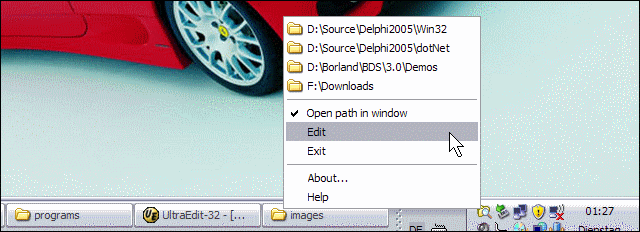
Menu
The menu is shown above. At the top you find the folders for quick selection. Below that, you’ll find menu items to set the option to open the path in a window, to edit the list and to exit the program. At the bottom, you see items for the about box and the help file.
List editor
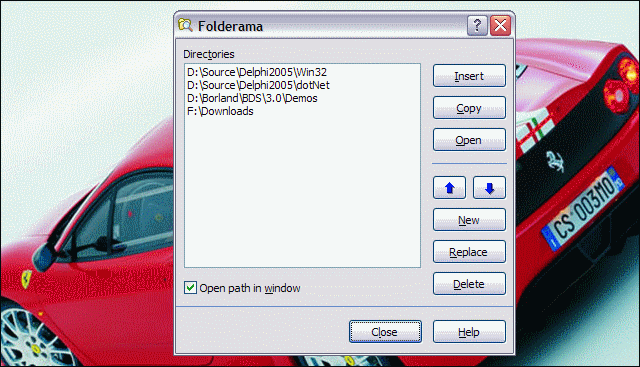
The editor allows you to do a few things. The top three buttons on the right allow you to use the selected entry in the list. Insert will try to insert it into an open file dialog box. Copy will copy the folder to the clipboard. Open will open the folder in the Windows Explorer.
The buttons below that, are for manipulation of the list. The blue arrow buttons will move an entry up or down in the list, while the other buttons enable you to add, replace or delete an entry in the list.
If you check the checkbox marked Open path in window, folder menu entries will cause the folder to be opened. Otherwise the folder menu entries will cause the folder name to be copied to the clipboard or an open file dialog.
Legalese
Folderama is freeware. All rights are reserved. Its code is provided as is, expressly without a warranty of any kind. You use it at your own risk.
I hope this code is useful to you. If you use some of it, please credit me. If you modify or improve the code, please send me the modifications.
I may improve or enhance Folderama myself, and I will try to post changes here. But this is not a promise. Please don’t request features.
Rudy Velthuis
Standard Disclaimer for External Links
These links are being provided as a convenience and for informational purposes only; they do not constitute an endorsement or an approval of any of the products, services or opinions of the corporation or organization or individual. I bear no responsibility for the accuracy, legality or content of the external site or for that of subsequent links. Contact the external site for answers to questions regarding its content.
Disclaimer and Copyright
The coding examples presented here are for illustration purposes only. The author takes no responsibility for end-user use. All content herein is copyrighted by Rudy Velthuis, and may not be reproduced in any form without the author's permission. Source code written by Rudy Velthuis presented as download is subject to the license in the files.


Copyright © 2014 by Rudy Velthuis